Showing posts with label Javascript & jQuery. Show all posts

Saturday, February 10, 2018

Get ID from Interactive Report or Interactive Grid on Click & Highlight Row

Using Dynamic Action, we can get the column value in item from interactive report.

Click below link to see demo-

https://apex.oracle.com/pls/apex/f?p=S_MYDEMO:GETID:&APP_SESSION.:::::

How it works?

First set Static ID in your report-


Then, go to the column of which you want to get the value in item and change it to link and set link attributes-
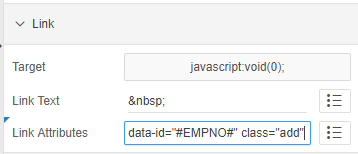


So here, I am trying to get the employee number.

That's it at report level, now move to dynamic action.

Create an Item, P2_ADD.

Create new DA, set to Click with jQuery selector-


Create True action >> Execute JavaScript code


Create True action >> Execute Server Side/plsql code
    pass null in body.
    Items to Submit --> :P_ITEM

$s('P34_MT_ID', $(this.triggeringElement).data('id'));

$(".my-report td[headers=my-id]").each(function(){
            $(this).closest('tr').removeClass('u-warningcustom');
            $(this).closest('tr').addClass('u-warningcustom1');
    });

$(this.triggeringElement).closest('tr').removeClass('u-warningcustom1');
$(this.triggeringElement).closest('tr').addClass('u-warningcustom');

Inline CSS-
.u-warningcustom td {
    background-color: #edfcef !important;
}
.u-warningcustom1 td {
    background-color: white !important;
}
                                                    
                                                    ✍ It's Done. ✌

Friday, July 8, 2016

How to show Post Text dynamically in Text Field in Oracle APEX and in HTML on Focus using jQuery and CSS?

In Oracle Apex-

Click below link to see demo-
https://apex.oracle.com/pls/apex/f?p=S_MYDEMO:POSTXT:&APP_SESSION.:::::

Create page items as text field P3_TEXT1, then create dynamic action
as Get Focus > Items > name
Create True action > Set Value
give some value e.g., *
select affected element as jquery selector > .t-Form-itemText--post
Create True action > Execute JavaScript Code
$(".apex-item-text").focus(function (){
$(".t-Form-itemText--post").css('display','none');
    $(this).next(".t-Form-itemText--post").css('display','inline').show();
    $(this).next(".t-Form-itemText--post").animate({ color: "rgb( 150, 10, 160 )"},'slow');
});

It's Done.

HTML Example:

<html>
<head>
<style>
#sp {display:none;color:red;}
</style>
<script type="text/javascript">
$("input").focus(function (){
$(this).next("#sp").css('display','inline').blink(2000);
});
</script>
</head>
<body>
<p>Field 1<input type="text" /><span id="sp">&nbsp;mandatory</span></p>
<p>Field 2<input type="text" /><span id="sp">&nbsp;mandatory</span></p>
</body>
</html>


Thursday, July 7, 2016

How to change or toggle image onClick ?


Take two different images to toggle.
we can achieve this functionality by using javascript or by jQuery.

HTML-

<img src="images/arrow-up.png" onclick="hide_f(this)" style="display:none;" class="class_1" id="minus_2" />

<img src="images/arrow-down.png" onclick="show_f(this)" class="class_1" id="plus_2" />

Javascript-

Using function names-

function show_f(ele) {
document.getElementById("minus_2").style.display = "block";
document.getElementById("plus_2").style.display = "none";
}
function hide_f(elem) {
var id2 = elem.id;
document.getElementById("minus_2").style.display = "none";
document.getElementById("plus_2").style.display = "block";
}

jQuery-

Using jQuery functions-

jQuery(function ($) {
        $(document).ready(function(){
   $("#plus_2, #minus_2").click(function(){
    $("#minus_2, #plus_2").toggle();
   });
 });
});