Showing posts with label Oracle APEX. Show all posts

Saturday, February 18, 2023

Dynamic List Region displaying as Badges | Oracle APEX

 This list template provides a list of links which can be used for navigation and other action-oriented tasks. I have used badges. You can optionally show badges, icons, sub list items, and more.

Shared Components


Create List


Dynamic List


Region Attributes


Run Page


Thursday, March 15, 2018

Change to Single row view after report refresh Oracle Apex

Change to single row view after report refresh.

Create Page item P3_REM (give any name) and set the value to 1.
Set the static id for report region.

Create dynamic action refer below screen-shots.

Demo: Click here >


Saturday, February 10, 2018

Get ID from Interactive Report or Interactive Grid on Click & Highlight Row

Using Dynamic Action, we can get the column value in item from interactive report.

Click below link to see demo-

https://apex.oracle.com/pls/apex/f?p=S_MYDEMO:GETID:&APP_SESSION.:::::

How it works?

First set Static ID in your report-


Then, go to the column of which you want to get the value in item and change it to link and set link attributes-
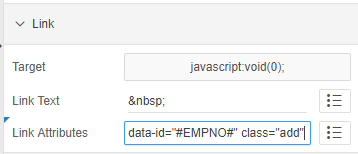


So here, I am trying to get the employee number.

That's it at report level, now move to dynamic action.

Create an Item, P2_ADD.

Create new DA, set to Click with jQuery selector-


Create True action >> Execute JavaScript code


Create True action >> Execute Server Side/plsql code
    pass null in body.
    Items to Submit --> :P_ITEM

$s('P34_MT_ID', $(this.triggeringElement).data('id'));

$(".my-report td[headers=my-id]").each(function(){
            $(this).closest('tr').removeClass('u-warningcustom');
            $(this).closest('tr').addClass('u-warningcustom1');
    });

$(this.triggeringElement).closest('tr').removeClass('u-warningcustom1');
$(this.triggeringElement).closest('tr').addClass('u-warningcustom');

Inline CSS-
.u-warningcustom td {
    background-color: #edfcef !important;
}
.u-warningcustom1 td {
    background-color: white !important;
}
                                                    
                                                    ✍ It's Done. ✌

Tuesday, November 21, 2017

Oracle 12c and Interactive Grid Oracle Apex

To make Interactive Grid work smoothly using auto generate sequence feature of Oracle 12c, remove the Primary Key column or the column on which you have auto generate sequence from SQL query in Interactive Grid.
That's it!

To know how to generate Auto Sequence, click on below link
http://mythass.blogspot.my/2017/11/auto-generate-sequence-in-oracle-12c.html

I hope the above is useful to you.


Wednesday, July 29, 2015

How to upload a text file and write into a table in Oracle APEX?

By default, all files using the “File Browse..” element will be uploaded to the “wwv_flow_files” table which has structure as follows:
?
01
02
03
04
05
06
07
08
09
10
11
12
13
14
15
16
17
18
19
20
21
22
SQL> desc wwv_flow_files
Name         Type           Nullable Default Comments
------------ -------------- -------- ------- --------
ID           NUMBER
FLOW_ID      NUMBER
NAME         VARCHAR2(90)
FILENAME     VARCHAR2(400)  Y
TITLE        VARCHAR2(255)  Y
MIME_TYPE    VARCHAR2(48)   Y
DOC_SIZE     NUMBER         Y
DAD_CHARSET  VARCHAR2(128)  Y
CREATED_BY   VARCHAR2(255)  Y
CREATED_ON   DATE           Y
UPDATED_BY   VARCHAR2(255)  Y
UPDATED_ON   DATE           Y
LAST_UPDATED DATE           Y
CONTENT_TYPE VARCHAR2(128)  Y
BLOB_CONTENT BLOB           Y
LANGUAGE     VARCHAR2(30)   Y
DESCRIPTION  VARCHAR2(4000) Y
FILE_TYPE    VARCHAR2(255)  Y
FILE_CHARSET VARCHAR2(128)  Y
Even though the text file contains character data, the uploaded file content will be stored in the “binary format” in a BLOB column named BLOB_CONTENT. Due to nature of BLOB, to read character out, the conversion using “chr” function is required. Please see a good article about this concept and conversion by Natalka Roshak on the orafaq at http://www.orafaq.com/node/895.
I modified the sample script provided in above article to suite my need – reading each line of the text file and insert into a target table.
?
01
02
03
04
05
06
07
08
09
10
11
12
13
14
15
16
17
18
19
20
21
22
23
24
25
26
27
28
29
30
31
32
33
34
35
36
37
38
39
40
41
42
43
DECLARE
v_blob_data       BLOB;
v_blob_len        NUMBER;
v_position        NUMBER;
v_raw_chunk       RAW(10000);
v_char      CHAR(1);
c_chunk_len   number       := 1;
v_line        VARCHAR2 (32767)        := NULL;
v_data_array      wwv_flow_global.vc_arr2;
BEGIN
-- Read data from wwv_flow_files
select blob_content into v_blob_data
from wwv_flow_files where name = 'F29800/Data_CSV.csv';
v_blob_len := dbms_lob.getlength(v_blob_data);
v_position := 1;
-- Read and convert binary to char
WHILE ( v_position <= v_blob_len ) LOOP
 v_raw_chunk := dbms_lob.substr(v_blob_data,c_chunk_len,v_position);
 v_char :=  chr(hex_to_decimal(rawtohex(v_raw_chunk)));
 v_line := v_line || v_char;
 v_position := v_position + c_chunk_len;
-- When a whole line is retrieved
 IF v_char = CHR(10) THEN
-- Convert comma to : to use wwv_flow_utilities
   v_line := REPLACE (v_line, ',', ':');
-- Convert each column separated by : into array of data
   v_data_array := wwv_flow_utilities.string_to_table (v_line);
-- Insert data into target table
   EXECUTE IMMEDIATE 'insert into TABLE_X (v1, v2, v3, v4)
    values (:1,:2,:3,:4)'
    USING
      v_data_array(1),
      v_data_array(2),
      v_data_array(3),
      v_data_array(4);
-- Clear out
   v_line := NULL;
  END IF;
 END LOOP;
END;
/