Tuesday, September 20, 2022

How to Generate RSA Private Keys in Oracle Cloud Infrastructure OCI Tenancy?

 RSA Private Keys

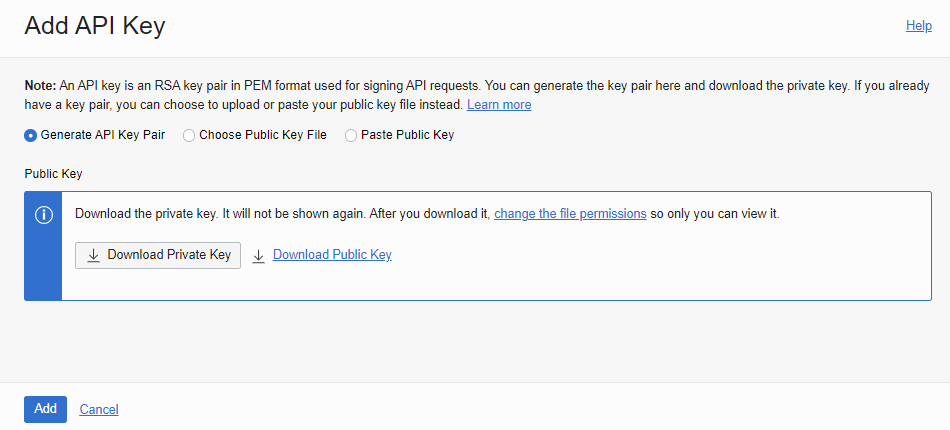
Click on your Profile > Go to oracleidentitycloudservice/_userid_


At the bottom of this page, you will find API Keys


Click on Add Key to generate private or public keys.


Download Private RSA keys


                                                    ✍ It's Done. ✌

Friday, August 26, 2022

Get Month name and Week name in Dart Flutter

 import 'package:intl/intl.dart';


void main() {

  print(DateTime.now().month); // get current month number

  print(DateTime.november); // get given month number


  DateTime date = DateTime.now();

  print(DateFormat('MMMM').format(date)); // get current month name

  print(DateFormat('EEEE').format(date)); // get current week name

}


// below url has the supported set of skeletons, e.g., 'MMMM', 'EEEE'

// https://api.flutter.dev/flutter/intl/DateFormat-class.html#:~:text=constructor%20is%20preferred.-,ICU,-Name%20%20%20%20%20%20%20%20%20%20%20%20%20%20%20%20%20%20%20Skeleton%0A%20%2D%2D%2D%2D%2D%2D%2D%2D%20%20%20%20%20%20%20%20%20%20%20%20%20%20%20%20%20%20%20%2D%2D%2D%2D%2D%2D%2D%2D%0A%20DAY


.map() method in DART

 import 'dart:convert';

Welcome welcomeFromJson(String str) => Welcome.fromJson(json.decode(str));

void main() {
  Map<String, dynamic> json = {"items":[{"id":83,"description":"Test 1"}]};
  List myList = List<Item>.from(json["items"].map(myFunc));//(x) => Item.fromJson(x)));
  print(myList[0].eId);
  print(myList[0].eDescription);
}

myFunc(x) {
  print(x); // {id: 83, description: Test 1} // output of .map() method
  return Item.fromJson(x);
}

class Welcome {
    Welcome({
        required this.items,
    });

    List<Item> items;
 
    factory Welcome.fromJson(Map<String, dynamic> json) => Welcome(
        items: List<Item>.from(json["items"].map((x) => Item.fromJson(x))),
    );  
}

class Item {
    Item({
        this.eId,
        this.eDescription,
    });

    int? eId;
    String? eDescription;

    factory Item.fromJson(Map<String, dynamic> json) => Item(
        eId: json["id"],
        eDescription: json["description"],
    );
}

Monday, March 22, 2021

Remove duplicates from a string separated by colon Oracle SQL using REGEXP


Remove duplicates from a string separated by colon or by any keyword


select distinct str from (
select regexp_substr('abc:xyz:abc:pqr:xyz','[^:]+',1,level) str from dual
connect by level <= regexp_count('abc:xyz:abc:pqr:xyz','[^:]+', 1)
);


Monday, July 16, 2018

How to get MAX DATE for each ID in Oracle?


Take the max from sub-query using group by and in outer query set equal (=) condition of max_date


SELECT T1.ACC_ID, T1.DATE AS MAX_DATE, T1.COL1, T1.COL2
  FROM EMP T1,

       (SELECT ACC_ID, MAX(DATE) AS MAX_DATE_I FROM EMP GROUP BY ACC_ID) T2

 WHERE T1.ACC_ID = T2.ACC_ID
   AND T1.MAX_DATE = T2.MAX_DATE_I
   AND ACTIVE_FLAG = 'Y';

--===============================================================

SELECT T1.DEPTNO, T1.HIREDATE
  FROM EMP T1,
       (SELECT DEPTNO, MAX(HIREDATE) AS MAX_DATE FROM EMP GROUP BY DEPTNO) T2
 WHERE T1.DEPTNO = T2.DEPTNO
   AND T1.HIREDATE = T2.MAX_DATE;

Thursday, March 15, 2018

Change to Single row view after report refresh Oracle Apex

Change to single row view after report refresh.

Create Page item P3_REM (give any name) and set the value to 1.
Set the static id for report region.

Create dynamic action refer below screen-shots.

Demo: Click here >


Saturday, February 10, 2018

Get ID from Interactive Report or Interactive Grid on Click & Highlight Row

Using Dynamic Action, we can get the column value in item from interactive report.

Click below link to see demo-

https://apex.oracle.com/pls/apex/f?p=S_MYDEMO:GETID:&APP_SESSION.:::::

How it works?

First set Static ID in your report-


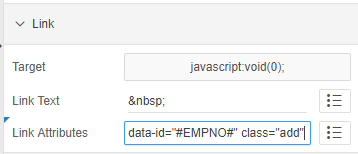
Then, go to the column of which you want to get the value in item and change it to link and set link attributes-


So here, I am trying to get the employee number.

That's it at report level, now move to dynamic action.

Create an Item, P2_ADD.

Create new DA, set to Click with jQuery selector-


Create True action >> Execute JavaScript code


Create True action >> Execute Server Side/plsql code
    pass null in body.
    Items to Submit --> :P_ITEM

$s('P34_MT_ID', $(this.triggeringElement).data('id'));

$(".my-report td[headers=my-id]").each(function(){
            $(this).closest('tr').removeClass('u-warningcustom');
            $(this).closest('tr').addClass('u-warningcustom1');
    });

$(this.triggeringElement).closest('tr').removeClass('u-warningcustom1');
$(this.triggeringElement).closest('tr').addClass('u-warningcustom');

Inline CSS-
.u-warningcustom td {
    background-color: #edfcef !important;
}
.u-warningcustom1 td {
    background-color: white !important;
}
                                                    
                                                    ✍ It's Done. ✌